multirotor
Simulation of multi-rotor unmanned aerial vehicles in python.
multirotor simulates the airframe, propellers, motors and battery of a UAV. It
includes a PID flight controller with automatic gain search, waypoint
trajectories, and Gymnasium environments for
reinforcement learning. The physics runs in compiled numba
kernels, so a simulation step takes microseconds.
What you can do with it
Create a vehicle in the way that fits the data you have:
From simple geometry:
helpers.vehicle_params_factorybuildsnevenly spaced propellers around a body.From measured values:
vehicle.VehicleParamstakes any propeller layout, inertia matrix,PropellerParams,MotorParamsandBatteryParams.From a ready-made model:
models.tarott18(an octorotor) andmodels.djimavicpro.From components:
Propeller,MotorandBatterycan be simulated on their own.helpers.learn_thrust_coefficientandhelpers.learn_speed_voltage_scalingfit coefficients to measurements.
Simulate at the level of detail you need:
Step with forces and torques (
Multirotor.step_dynamics) or with propeller speeds or voltages (Multirotor.step_speeds).Choose a quadratic thrust model, or a blade-element model in which thrust depends on airspeed.
Add motors with electrical dynamics, and a battery whose voltage sags with the current drawn and cuts off when empty.
Apply disturbance forces and torques, such as wind.
Follow waypoints with
trajectories.Trajectory, record withhelpers.DataLog, and view withvisualize.
Simulate many vehicles at once. fleet.Fleet steps through a list of vehicles together, and controller.FleetController controls all of them, each with its own PID gains. In a closed loop of 64 four-rotor vehicles, one step takes about 3 µs per vehicle without motors, and 15 µs with motors and a battery.
Control and tune. controller.Controller is a cascaded PID controller for position, velocity, attitude and rate. optimize.optimize searches its gains with optuna. Each trial flies the same set of start positions, and the best gains are scored on positions that the search did not fly.
Train agents. env.DynamicsMultirotorEnv takes forces and torques as actions, and env.SpeedsMultirotorEnv takes propeller speeds. Both follow the Gymnasium API. Subclass env.BaseMultirotorEnv to change the reward.
Run fast. One step_speeds call takes 12 µs for an 8-propeller vehicle, and 27 µs with motors. A closed loop of controller and vehicle takes 16 µs per step. See scripts/benchmarks to reproduce the numbers.
Example
Create a vehicle, tune a controller for it, and fly a path while logging:
import matplotlib.pyplot as plt
from multirotor.vehicle import PropellerParams, SimulationParams
from multirotor.helpers import vehicle_params_factory, DataLog
from multirotor.simulation import Multirotor
from multirotor.optimize import optimize, get_controller, apply_params
from multirotor.trajectories import Trajectory
from multirotor.visualize import plot_datalog

# 1. A quadrotor from simple geometry
propeller = PropellerParams(k_thrust=0.01, k_drag=1e-2, moment_of_inertia=1e-3)
sim = SimulationParams(dt=0.01)                  # time step in seconds
params = vehicle_params_factory(
    n=4, m_prop=0.01, d_prop=0.3, params=propeller, m_body=2)
vehicle = Multirotor(params, sim)

# 2. Search for controller gains that fly this vehicle to the origin (~1 min)
study = optimize(params, sim, ntrials=100)
ctrl = get_controller(vehicle)
apply_params(ctrl, study.best_params)

# 3. Fly through three waypoints and log the flight
log = DataLog(vehicle, ctrl)
trajectory = Trajectory(
    vehicle, points=[[5, 0, 5], [5, 5, 5], [0, 0, 2]], proximity=0.5, resolution=1)
for step, (position, feed_forward_velocity) in enumerate(trajectory):
    dynamics = ctrl.step(reference=[*position, 0], feed_forward_velocity=feed_forward_velocity)
    speeds = vehicle.allocate_control(dynamics[0], dynamics[1:4])
    vehicle.step_speeds(speeds)
    log.log()
    if step == 6000:                             # stop if a waypoint is not reached
        break
log.done_logging()
plot_datalog(log, figsize=(8, 6))
plt.show()
The Quickstart extends this example with motors and a battery, longer trajectories, and the Gymnasium environments. The Detailed Demo covers each component and the controller structure.
Code repository: Github
Please cite this as:
@inproceedings{ahmed2022multirotor,
    title={A high-Fidelity Simulation test-Bed for fault-Tolerant octo-Rotor Control Using Reinforcement Learning},
    author={Ahmed, Ibrahim and Quinones-Grueiro, Marcos and Biswas, Gautam},
    booktitle={2022 IEEE/AIAA 41st Digital Avionics Systems Conference (DASC)},
    year={2022},
    organization={IEEE}
}
Installation
Install from the Python Package Index (PyPI):
pip install multirotor
Or, clone repository and install for development. This will allow you to change the code of the package so the changes show up when you import multirotor in other projects.
git clone https://github.com/hazrmard/multirotor.git
cd multirotor
uv sync                  # creates .venv, installs package (editable) + dev group
uv sync --group docs     # also install documentation dependencies (used by Read the Docs)
uv sync --extra control  # optional `control` extra
Build and publish with uv:
uv build                 # writes sdist and wheel to dist/
uv publish               # uploads dist/* to PyPI (set UV_PUBLISH_TOKEN)
Code organization
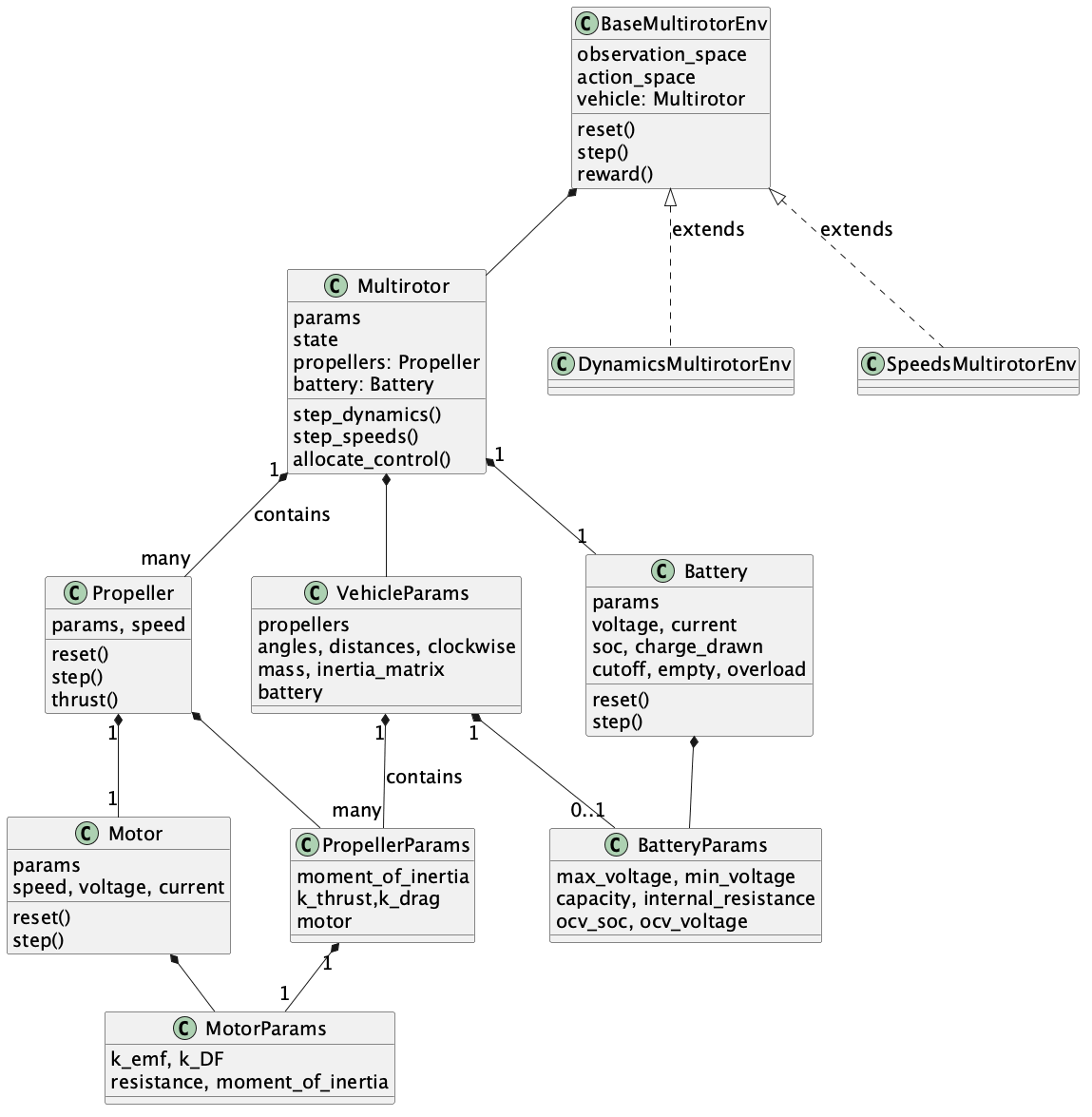
The following main classes are available in the code. For simulating the vehicle:
And for simulating control:
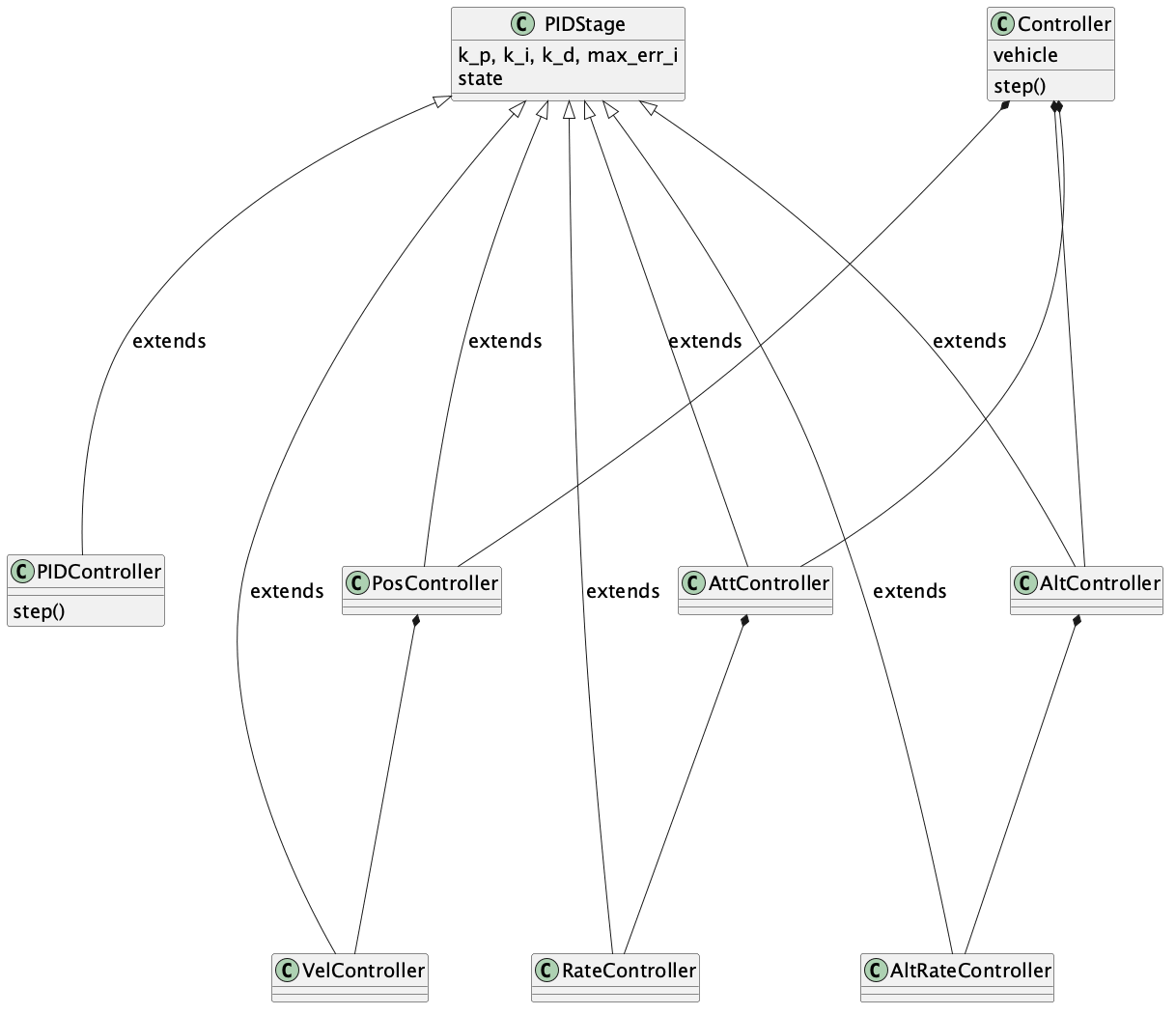
These diagrams show the classes a user works with. For developers, the module
docstrings of multirotor/physics.py and multirotor/dynamics.py show which
functions call which, and how the integrated state is laid out. Those of
multirotor/controller/pid.py and multirotor/controller/kernels.py do the same
for the controller. multirotor/fleet.py and multirotor/fleet_kernels.py show how a fleet’s arrays are laid out and which kernels its loops call. The compiled reward of the environments is in
multirotor/env_kernels.py.
